
Is CTRTool Good for Boosting Organic CTR? CTR Tool Review
Your organic CTR sits flat while rankings hold steady. A page that ranks third but earns fewer clicks than the listing below it is losing traffic you already paid for in content and links. The question is whether paid visits can shift that click share without risking the site.
This review covers what CTRTool actually does: campaign types across Google, Bing, Maps and AI Overviews, how keywords, location and visit paths are configured, pricing by credits, and the screenshot proof behind each visit. By the end you will know whether it fits your CTR problem.
What Is CTRTool? Campaign Types, Platforms and Who It Serves
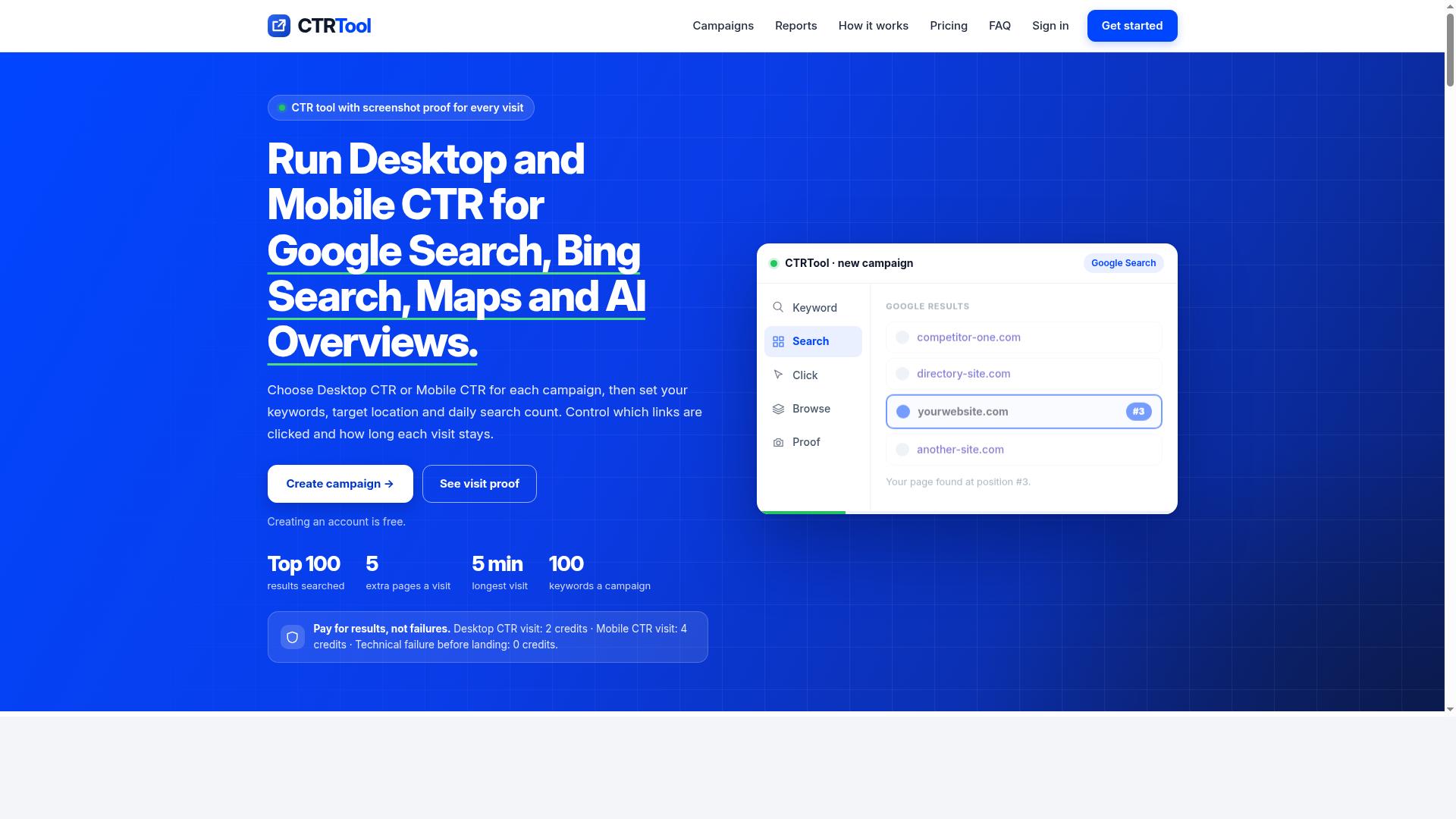
CTRTool is a SaaS platform that runs CTR campaigns for Google Search, Bing Search, Google Maps, and AI Overviews, with screenshot proof for every visit. It simulates organic clicks to influence CTR signals, the click-through behavior that search engines record on a result.
The platform covers four distinct campaign types, each built around a different surface where users click:
- Google Search CTR: searches a keyword and clicks the organic result
- Bing Search CTR: the same process applied to Bing results
- Google Maps CTR: finds a business listing and clicks its website link
- AI Overview CTR: finds the site inside the overview and clicks its source link
Within each campaign, users target keywords, set locations, and choose Desktop CTR or Mobile CTR. Visits are delivered through Desktop Chrome windows and real Android phone sessions, matched to the target location through managed proxy routes.
The tool is designed for SEO practitioners and agencies managing client sites, where organic CTR and SERP CTR work sits alongside title tag and meta description optimization. Because CTRTool states plainly that automated visits do not guarantee rankings, it reads best as a signal-shaping aid rather than a ranking switch.
How CTRTool Runs a Campaign: Keywords, Location, Daily Search Count and Visit Paths
Running a campaign in CTRTool involves selecting a campaign type, entering keywords, setting a target location, specifying daily search volume, and defining visit paths. Each step maps to a concrete field in the setup flow.
- Choose the campaign type: Google Search, Bing Search, Google Maps, or AI Overviews
- Add keywords: up to 100 keywords per campaign
- Set the location: country, state, and city, or "Any country"
- Set the daily search count: with now, spread out, or gap timing, plus days, hours, and time zone (daily goals reset at 00:00 UTC)
- Configure visit paths: target URL, internal page URLs, and link text
Users also control click order, scrolling time, and up to five additional pages per visit, with visits lasting up to five minutes in total. Desktop or Mobile visits are chosen per campaign, and search depth reaches up to 100 results.
Two coverage limits matter in practice. Search campaigns require the page to rank in the top 100 results, and Maps campaigns check up to 50 listings under city targeting. Reports then show full visit paths, search and website screenshots, and keyword positions over time, including Search positions, Maps listing order, and AI citation order. That reporting loop supports CTR optimization decisions, since you can judge search result appearance against movement rather than guesswork. Custom form filling and other custom actions are available through support for a separate agreed one-time fee.
Is CTRTool Good for Boosting Organic CTR? The Direct Answer
Yes, CTRTool can be effective for boosting organic CTR, but its impact depends on how you use it and the competitive landscape. It works by simulating searches and visits, which can lift the click-through rate your pages show for target queries.
The logic behind this approach is that some search algorithms weigh user engagement signals when ranking pages. A stronger SERP CTR may support visibility over time, though results vary by niche, keyword difficulty, and how competitive the first page is.
It is important to be clear about the limits. CTRTool is not a replacement for quality content, and no tool can guarantee a ranking jump. Think of it as one input among many, alongside solid title tag optimization, useful meta descriptions, and content that actually satisfies the search intent.
The debate around CTR manipulation as a ranking factor is ongoing. Some SEOs argue engagement signals carry real weight, while others treat them as a minor or indirect influence. CTRTool sits in that contested space, so expectations should stay realistic rather than assuming a fixed outcome.
Where CTRTool adds accountability is in verification. It provides screenshot proof for every visit, with search and landing screenshots supplied as separate proof images. Full visit paths are recorded as well, so you can see how each simulated session progressed rather than taking activity on trust.
Measurement is built into the workflow. The tool tracks keyword positions over time, including Maps listing order and AI citation order, which lets you compare movement against your campaign timeline. That ongoing tracking is what turns a CTR campaign into something you can actually evaluate.
The credit model also keeps spending tied to real outcomes. Credits are not charged for technical failures that occur before landing, and visits that cannot verify the requested location use no credits. That pay-for-results structure means failed attempts do not eat into your budget.
Scale and flexibility are reasonable for most SEO workflows. You can run up to 100 campaigns with 100 keywords each, with visits lasting up to 5 minutes and up to 5 additional internal pages per visit. One credit balance is shared across all campaign types, websites, and keywords, and unused credits roll over while you stay subscribed.
So the direct answer holds: CTRTool is a credible option for CTR optimization when paired with genuine content improvements. It is strongest as a supporting tactic that produces verifiable engagement and measurable position tracking, not as a shortcut that replaces the fundamentals of SEO.
Key Features and What Makes CTRTool Stand Out
CTRTool differentiates itself through verifiable visit proof and comprehensive position tracking across multiple search surfaces. Rather than asking users to take results on faith, the platform builds accountability into every campaign it runs.
The tool supports CTR campaigns for Google Search, Bing Search, Maps and AI Overviews, with proof attached to each visit. That combination of breadth and evidence is what separates it from tools that report activity without showing it.
Two feature groups carry most of that weight. First, screenshot proof and full visit paths document what actually happened during a visit. Second, keyword position tracking shows how rankings move over time, including Maps listing order and AI citation order.
Together, these features give users transparency and measurable results instead of vague progress reports. The sections below break down how each one works.
Screenshot Proof and Full Visit Paths for Every Visit
Every CTRTool visit generates separate search and landing screenshots, along with the full path taken from search to conversion. The search screenshot shows the keyword used and the result that was clicked. The landing screenshot shows the page the visitor actually reached.
Visits can last up to 5 minutes and include up to 5 additional internal pages. The full visit path captures that internal navigation, so the record reflects more than a single pageview. This proof is available for all campaign types, not just a premium tier.
For agencies, that documentation changes the client conversation. Instead of describing activity in a report, an agency can show screenshots and visit paths that back up the work. That kind of transparency helps build trust and makes results easier to defend.
The proof also pairs with the platform's pay-for-results model. No credits are charged for technical failures that occur before landing, and visits that cannot verify the requested location use no credits. Users only spend credits on visits that can be evidenced.
Keyword Position Tracking Across Search, Maps and AI Overviews
CTRTool tracks keyword positions over time, including Maps listing order and AI citation order, giving users a clear view of ranking changes. It monitors where a page ranks for target keywords in Google Search, Bing Search, Google Maps and AI Overviews.
The tracking goes beyond a single average position number. For Maps, it records listing order among up to 50 listings. For AI Overviews, it records citation order, which matters as more searches surface AI-generated answers at the top of the page.
This data helps users judge whether a campaign is working and adjust strategy accordingly. If positions hold steady or improve alongside campaign activity, that is a useful signal. If they slip, the historical record shows exactly when the change happened.
Tracking is ongoing, and historical data remains available, so users can compare periods rather than relying on a single snapshot. Position history also complements the visit proof described above, giving a fuller picture of both search result appearance and the traffic that followed.
Pricing and Plans: Credits, Visit Types and What You Pay For
CTRTool offers monthly plans in USD: Starter at $59/month for 2,000 credits (up to 1,000 Desktop CTR visits or 500 Mobile CTR visits) and Growth at $125/month for 5,000 credits (up to 2,500 Desktop or 1,250 Mobile visits). Growth is marked Recommended, which makes sense given the larger credit pool for a modest price jump.
Two higher tiers exist for heavier campaigns. Scale costs $399/month for 20,000 credits, supporting up to 10,000 Desktop or 5,000 Mobile visits. Agency sits at $699/month for 40,000 credits, covering up to 20,000 Desktop or 10,000 Mobile visits. Always check the website for current pricing before committing.
| Plan | Monthly Price | Credits | Desktop Visits | Mobile Visits |
|---|---|---|---|---|
| Starter | $59 | 2,000 | 1,000 | 500 |
| Growth (Recommended) | $125 | 5,000 | 2,500 | 1,250 |
| Scale | $399 | 20,000 | 10,000 | 5,000 |
| Agency | $699 | 40,000 | 20,000 | 10,000 |
Credits are consumed per visit, and the cost depends on the device type. A Desktop CTR visit costs 2 credits, while a Mobile CTR visit costs 4 credits. That difference explains why every plan supports roughly half as many mobile visits as desktop ones.
Failed visits are treated fairly. A verified search without a match costs 1 credit, and a technical failure before landing costs 0 credits. You are not charged in full for delivery that did not happen, which matters when you are budgeting a CTR optimization campaign around organic traffic goals.
Unused credits roll over while your subscription is active, and they expire when a cancellation takes effect. Creating an account is free, so you can inspect the dashboard before paying anything. Custom development is available as a separate, agreed one-time fee.
What you actually pay for goes beyond raw visits. Each plan includes screenshot proof of delivery, position tracking, and multi-platform support. Those elements are what separate a measurable CTR campaign from blind spend, since you can verify search result appearance and average position movement rather than guessing.
A limited launch pricing note on the site states that prices rise 30% on November 15, with the page also showing November 15, 2026. Anyone evaluating the tool for the long term should factor that into timing. At current rates, the entry point stays low relative to most paid traffic channels, though exact comparisons depend on your niche and keyword costs.
The verdict on value is straightforward. Credits map cleanly to visit types, failures are refunded in credits, rollover protects active subscribers, and the proof features support genuine SEO tool review standards. For a tool aimed at boosting organic CTR, the pricing structure is transparent and easy to plan around.
Trust Signals: Proof Model, Eligibility Rules and Billing Transparency
CTRTool builds trust through its proof model, clear eligibility rules, and transparent billing. Instead of asking users to take results on faith, the platform documents each campaign visit so you can review what happened and where. That evidence trail is what separates a serious CTR optimization tool from vague promises about ranking boosts.
The proof model rests on screenshot proof for every visit, covering both the search interaction and the landing page. You get a verifiable record rather than a summary count. Full visit paths are also captured, so you can trace how a session moved from the search result to the destination page.
Position tracking adds a third layer of evidence. Because the tool records where a listing sat at the time of the visit, you can compare that against what you see in Google Search Console and judge consistency for yourself. This matters for anyone running CTR optimization who wants to separate real movement from noise.
Eligibility rules are stated up front, which keeps expectations realistic. The requirements differ by campaign type:
- Search campaigns: the page must appear within the top 100 organic results for the chosen keyword and location.
- Maps campaigns: up to 50 listings are checked, roughly five pages of results.
- AI Overview campaigns: a matching source link is required for the query.
These thresholds are worth checking before you build a campaign. A page ranking outside the top 100 for a keyword is not eligible, and no amount of budget changes that. Knowing the rule in advance avoids wasted setup time and keeps your organic CTR efforts focused on pages that can actually appear in results.
Billing follows a straightforward structure. CTRTool runs on monthly plans with credit-based usage, and one balance covers all campaigns, with support for up to 100 campaigns and 100 keywords per campaign. There are no hidden fees layered on top.
Daily goals reset at 00:00 UTC, so credit consumption follows a predictable rhythm you can plan around. If something is unclear, support is available via email. Combined with the screenshot evidence and published eligibility rules, the billing model gives you a clear picture of cost and outcome before you commit.
It is equally important to note what CTRTool does not claim. The platform explicitly does not guarantee higher rankings, leads or sales. That honesty is itself a trust signal: the tool provides verifiable visit records and transparent rules, and it leaves the ranking outcome to Google.
Who Should Use CTRTool
CTRTool is designed for SEO practitioners and agencies running CTR campaigns for their own or client websites across Google Search, Bing Search, Google Maps, and AI Overviews. That focus makes it a natural fit for people who treat organic CTR as a lever worth managing, not just a metric to report.
The tool suits professionals who understand how search result appearance shapes user behavior. They want to test how title tags and meta descriptions perform in live SERPs and see whether higher click-through rates move the needle on rankings.
Below are the main user types and the use cases where CTRTool makes the most sense.
- SEO professionals who want to influence CTR signals for competitive keywords and track how snippet changes affect click-through rate.
- Agencies managing CTR campaigns across multiple client properties, including local and map-based visibility.
- Site owners who want to test title tag optimization and meta description optimization against real search behavior instead of guesswork.
CTRTool also fits campaign work that spans devices. It supports both desktop and mobile campaigns, which matters because SERP CTR and search result appearance can differ sharply between the two. A title that earns clicks on a desktop layout may underperform on a phone, so testing both gives a clearer picture of organic CTR.
Testing is a core use case. Practitioners can run A/B testing on headlines and snippets, compare results, and verify campaign outcomes with proof rather than assumption. That makes the tool useful for snippet testing and headline testing on pages where small changes to search result appearance could shift click-through rate meaningfully.
Another use case is accountability. Agencies working with clients often need evidence that CTR optimization work delivered something measurable. CTRTool's emphasis on verifying campaign results supports that reporting need.
It is worth noting that the site's own guidance mentions using tier links, PBNs, and test properties. That positions CTRTool toward practitioners who already work with advanced SEO tactics and understand the tradeoffs involved. Readers considering those methods should weigh them against search engine guidelines before committing.
In short, CTRTool is built for people who actively manage organic CTR as part of a broader SEO strategy. SEO professionals, agencies, and hands-on site owners running campaigns across Google Search, Bing Search, Google Maps, and AI Overviews are the audience it serves best.
Final Verdict: Is CTRTool Worth It for Organic CTR?
CTRTool is worth considering if you need a verifiable CTR campaign tool with multi-platform support and transparent pricing. It gives SEOs and agencies a way to run CTR optimization campaigns and back up the work with visible evidence rather than vague promises.
The core strength is screenshot proof. Campaign results can be documented, which matters when a client asks whether the effort produced real movement in search result appearance. Pair that with position tracking, and you get a clearer picture of how a page is performing across the SERP over time.
Multi-platform campaign support adds flexibility. Teams managing several properties or markets can run campaigns in one place instead of juggling separate setups. Clear pricing removes another common frustration in this category, since buyers can see the cost before committing.
The limitations deserve equal weight. CTRTool is a CTR manipulation tool, so results may vary depending on the page, the query, and the market. Pages also need to meet the tool's eligibility criteria before a campaign can run, which means not every URL is a fit from day one.
For agencies and SEOs who value proof and accountability, the trade-off is reasonable. Screenshot evidence and position tracking support reporting, while transparent pricing keeps budgets predictable. Teams that want documented CTR optimization work rather than guesswork will find the most value here.
If you have questions about eligibility or how the tool fits your workflow, contact support at vaibhav@autoblogging.ai. The site also lists Sign in, Create an account, Support, Terms of use, and Legal notices pages for reference.
Bottom line: CTRTool earns a positive verdict for organic CTR campaigns. It is a legitimate, purpose-built option with verifiable proof, tracking, multi-platform reach, and honest pricing. Teams prepared to meet the eligibility rules and accept that outcomes vary will find it a practical addition to their SEO toolkit.
Frequently Asked Questions
What exactly does CTRTool do to help boost organic CTR?
CTRTool runs Desktop and Mobile CTR campaigns for Google Search, Bing Search, Maps and AI Overviews. You set your keywords, target location and campaign type, and CTRTool sends visits to your chosen result or listing. Every visit comes with screenshot proof, so you can verify the activity behind your campaigns.
How do I know the visits are real and actually happened?
Every CTRTool visit includes screenshot proof, with search and landing screenshots provided as separate proof images. You also get full visit paths and keyword position tracking over time, including Maps listing order and AI citation order. This lets you confirm each visit rather than taking results on trust.
What are the requirements for my page to be eligible for a campaign?
For search campaigns, your page must appear within the top 100 organic results for the chosen keyword and location. Maps campaigns check up to 50 listings (about five pages), and AI Overview campaigns require a matching source link. Meeting these conditions before launching helps your campaign run smoothly.
Can I target specific countries or cities with my campaigns?
Yes. CTRTool is a global online service, and campaigns can target a chosen country with an optional state and city, or "Any country" to use a mix of supported locations. No country restrictions are stated, so you can align campaigns with your actual market.
How does CTRTool's pricing work?
CTRTool uses monthly plans priced in USD with a credit-based system: Starter is $59/month for 2,000 credits (up to 1,000 Desktop CTR visits or 500 Mobile CTR visits), and Growth is $125/month for 5,000 credits (up to 2,500 Desktop or 1,250 Mobile visits). Because you pay for results through credits, you can match your plan to your campaign volume.
Who is CTRTool designed for?
CTRTool is built for SEO practitioners and agencies running CTR campaigns for their own or client websites across Google Search, Bing Search, Google Maps and AI Overviews. If you need verifiable campaign activity with screenshot proof and position tracking, it fits that workflow. For questions, support is available at vaibhav@autoblogging.ai.